
Viewing and Searching for Enforcement Actions
Search for enforcement actions in SES and open the desired enforcement action to view its details.
About this task
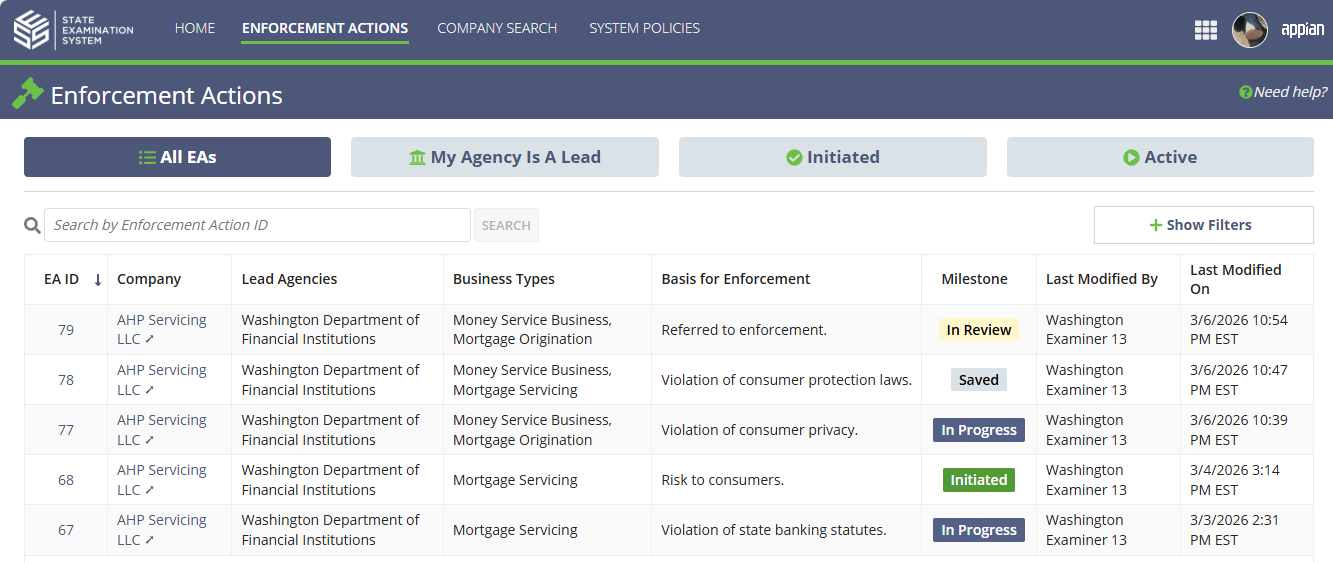
The Enforcement Actions page allows you to search and view enforcement actions in SES. From this page, you can search by enforcement action ID or apply filters to locate enforcement actions associated with your agency.
Search results appear in the All EAs grid, which displays information about each enforcement action including the company, lead agencies, business types, basis for enforcement, and current milestone.
Procedure
- Select Enforcement Actions from the top navigation menu.
-
Search for an enforcement action using one of the following methods:
-
Select Show Filters to refine the results using additional search criteria.
-
Select Show Filters to refine the results using additional search criteria.
- Review the enforcement actions displayed in the results grid.
- Select the EA ID link for the enforcement action you want to view.
Results
The enforcement action opens and you can view its details and related information.