Bulk Downloading Supervisory Activity Documents for Companies
How a company can download all supervisory
activity (SA) documents, including documents sent to the company from the agency and documents
uploaded by the company and shared with the agency.
About this task
All active company participants on a supervisory activity can
bulk download SA documents at any point before the retention period for the documents has been
reached.
Procedure
Navigate to your supervisory activity.
Click Related Actions.
Click Bulk Download Documents.
Choose your desired category to download.
Information Request
Loan Request
Matters Requiring Attention
Report
All Documents
Click Send Request.
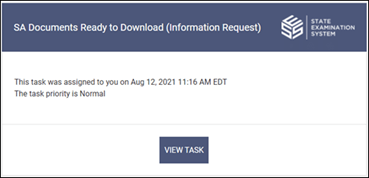
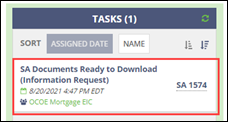
You will receive an email notification and a task will be assigned in the system
for you to download the documents. You will have 60 minutes to complete this task,
otherwise the task will expire, and you must submit a new bulk download request.
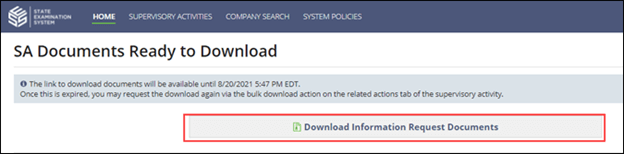
Click the task on the homepage.
Click Download Documents.
Results
A folder with all relevant documents is downloaded in your browser.
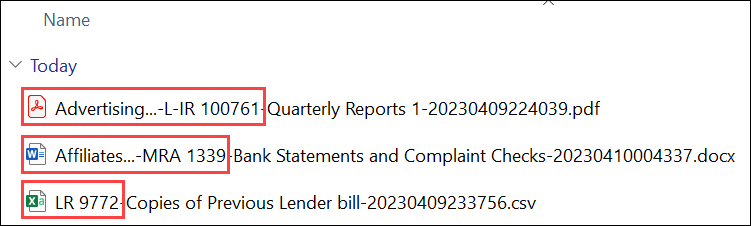
Note: To help better organize the documents and provide context about
where each document occurred within the SA, identifying attributes are added to the
filenames for company and agency response documents. It is recommended to sort the extracted
folder by name to best make use of the added identifying attributes.Figure 1. Extracted files with the added identifying attributes of the abbreviated area for
review (AFR) name and then the information request (IR), loan request (LR) or matter
requiring attention (MRA) library ID numbers.
Need More Help?
Agency users, please visit the Secure Portal
for phone and email contacts.
Company users should call the Call Center at 1-800-269-6189.
Agency users should not call this number.